Create Retro VHS-Style Videos from Modern Photos
[Rewind] [Play] — that soft static hum, the slightly warped color, the timestamp blinking in the corner. Nostalgia has a very specific texture, and it’s not something a modern phone camera naturally produces. VHS-style content has made a strong comeback across social platforms, prized specifically for the imperfections modern cameras were designed to eliminate. Pippit’s Seedance 2.5 model can apply that exact retro texture to a completely modern photo, turning it into a short, convincingly nostalgic clip.
Since this format is basically a trip back to an old tape, let’s structure it like one.
[Rewinding…] Why this aesthetic keeps coming back
There’s a warmth to VHS-style imperfection that polished modern footage doesn’t have — the slight color bleed, the soft grain, the tracking lines. It reads as memory rather than documentation, which is exactly why creators reach for it when they want a photo to feel like something remembered rather than something recently taken.
[Tape Label] What makes a photo work for this treatment
- Photos with warm, natural lighting rather than harsh, overly crisp modern lighting.
- Simple compositions, since VHS texture tends to soften fine detail anyway.
- Candid, everyday moments rather than heavily posed or edited shots.
- A subject or setting that could plausibly belong to an earlier decade in tone, even if it’s modern.
[Play] Generating your retro clip
Step 1: Upload Your Photo and Write a Prompt with Timestamps
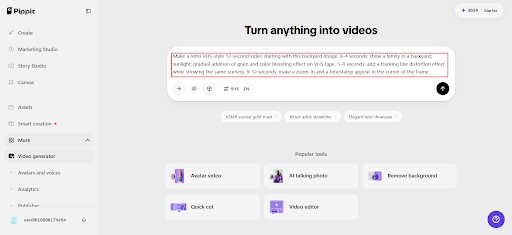
Go to Pippit’s Video Generator, pick Seedance 2.5, and upload your modern photograph. Create a prompt that includes the timestamps for the whole process.
Example: Make a retro VHS-style 12-second video starting with this backyard image. 0–4 seconds: show a family in a backyard; sunlight; gradual addition of grain and color bleeding effect on VHS tape. 5–8 seconds: add a tracking line distortion effect while showing the same scenery. 9-12 seconds: make a zoom-in and a timestamp appear in the corner of the frame.
Step 2: Change the Pacing to Emphasize Mood
Check your draft and think about how authentic the texture of VHS looks — is it sufficiently grainy, distorted, and does it have enough color shift, or does it just seem like another filter applied to the video? Adjust your prompt by focusing on particular elements of VHS tapes.

Step 3: Continue to Longer Sequence and Export Video
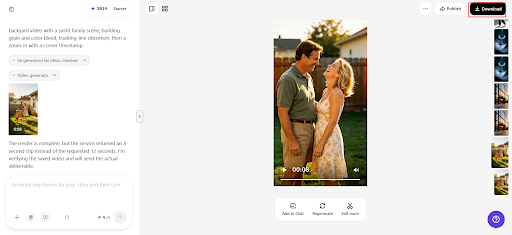
When creating a nostalgic sequence of clips, use the extension option to create one retro-style video from different photos. Save the result according to your needs.
[Tape library] Building a full retro collection
- Choose photos with genuinely warm, everyday moments rather than overly polished modern shots.
- Keep the retro texture consistent across a series so it reads as one cohesive “tape.”
- Pair each clip with a nostalgic caption or a fake “recorded on” date for extra effect.
- Treat this as a fun, ongoing AI video generator for turning an entire modern photo library into a nostalgic archive.
[Technical specs] What makes Seedance 2.5 suited to this look
Reduced “AI look” for authentic imperfection
Improved texture realism, when directed toward recreating analog imperfection rather than polish, helps a generated retro clip feel genuinely textured and warm rather than digitally flat.
Realistic motion for period-appropriate feel
Physics-aware motion rendering helps subtle movement — hair, fabric, background elements — feel natural within the softened, grainy retro frame, keeping the nostalgic effect convincing throughout the clip.
Extended runtime for a fuller nostalgic scene
With single-clip length increased from 15 to 30 seconds, a retro-style clip has room to unfold slowly, matching the unhurried pacing that old home movies naturally had.
[Audio track] Completing the effect with sound
Pairing the visual with a warm, slightly muffled audio layer — generated through a tool like SeedAudio 1.5 — adds the analog sound texture that makes a VHS-style clip feel complete, since the visual grain alone rarely sells the full nostalgic illusion on its own.
[SPECIAL FEATURES] Adding a fake timestamp overlay
The blinking timestamp in the corner of the frame is one of the most recognizable VHS details, and including one in a prompt — a specific fake date, a subtle flicker — adds an extra layer of authenticity that a plain grain filter alone doesn’t fully achieve.
[BONUS FOOTAGE] Recreating a specific decade’s look
Different decades had slightly different color and quality characteristics — warmer, softer tones for the 80s, slightly cooler and sharper for the early 2000s home camcorder era. Specifying a rough decade in the prompt helps tune the retro effect toward a more specific, recognizable era rather than a generic “old” look.
[DIRECTOR’S CUT] Combining VHS texture with home movie framing
Real home movies rarely had perfectly composed shots — a slightly off-center frame, an accidental zoom, a shaky pan. Intentionally requesting a touch of that same imperfect framing alongside the visual grain makes the final clip feel even more convincingly like found footage rather than a stylized modern video.
[DELETED SCENE] When the effect feels too clean
If a generated result still feels too polished despite the retro treatment, it usually means the grain or distortion needs to be pushed further, or the color grading needs a stronger shift away from crisp modern contrast — subtlety is rarely the goal with this particular aesthetic.
[BLOOPER REEL] Building a whole “home video” archive
A series of retro-style clips from different modern moments, presented together as if they were pulled from the same imaginary old tape, creates a surprisingly convincing nostalgic archive — one that often gets mistaken for genuine old footage by viewers scrolling quickly past it.
[Eject]
Some of the warmest-feeling content online isn’t actually old at all — it’s modern moments given the texture of memory. With Seedance 2.5 inside Pippit, that texture is achievable from any photo already sitting in your camera roll.
Next time a moment feels worth remembering, it might be worth opening Pippit and recording it onto its own imaginary tape.